
Library API (TypeScript)
chartjs2img ships a small TypeScript / Node library surface alongside the CLI and HTTP server. The CLI and server are thin wrappers around this library — rendering behavior is identical regardless of which entry point you use.
When to use the library directly
- You're already inside a Bun / Node service and want to render Chart.js without the IPC overhead of spawning a CLI or making an HTTP call to a sidecar.
- You need to customize request validation, caching, or error handling in ways the HTTP server doesn't expose as config.
- You want to render at build time in a script (e.g., generate dashboard snapshots for an email campaign).
If you don't need any of the above, the HTTP or CLI entry points are simpler to operate. See HTTP server and CLI rendering.
Install
# from npm (once published)
bun add chartjs2img
# or
npm install chartjs2img

# from source (dev)
git clone https://github.com/ideamans/chartjs2img
cd chartjs2img
bun install
bun run build:lib   # produces ./dist/*.js + *.d.ts
The default skia engine (native skia-canvas) renders in-process and needs no browser — installing the package is enough. Chromium is not a dependency of the npm package; it is only used by the browser engine, which downloads Chrome for Testing to the user cache on first use (macOS/Windows/Linux-x64) or reads CHROMIUM_PATH on linux-arm64.
Quick start
import { renderChart, closeBrowser } from 'chartjs2img'

const { buffer, hash, cached, messages } = await renderChart({
  chart: {
    type: 'bar',
    data: {
      labels: ['Jan', 'Feb', 'Mar'],
      datasets: [{ data: [12, 19, 3] }],
    },
  },
  width: 800,
  height: 600,
  format: 'png',
  engine: 'skia', // default — omit for skia, or pass 'browser'
})

await Bun.write('chart.png', buffer)         // or fs.writeFileSync for Node
console.log('rendered', buffer.length, 'bytes — cached?', cached)
if (messages.length) console.warn(messages)   // Chart.js warnings/errors

// When your process is about to exit:
await closeBrowser()
renderChart is async. On the default skia engine it renders in-process (native Skia canvas) with no browser to launch. On the browser engine, the first call launches a Chromium instance (lazy, shared across subsequent calls). Either way, concurrency is bounded by CONCURRENCY (default 8); additional calls queue.
Exports
All exports are available via the package root:
import {
  renderChart,
  closeBrowser,
  rendererStats,
  computeHash,
  DEFAULT_ENGINE,
  registerFonts,
  getFontLibrary,
  VERSION,
  NAME,
  BUNDLED_LIBS,
  type Engine,
  type RenderOptions,
  type RenderResult,
  type ConsoleMessage,
  type FontLibrary,
} from 'chartjs2img'
renderChart(options: RenderOptions): Promise<RenderResult>
The single render entry point. Internally:
computes a SHA-256 hash over the canonicalized options (the hash includes
engine, so the two engines cache independently);returns the cached image if one exists (
cached: true);otherwise acquires a semaphore slot and dispatches on
engine:skia(default) — renders in-process against a native Skia canvas (Chart.js + bundled plugins imported from npm), then encodes the buffer;browser— launches (or reuses) Chromium, opens a fresh page, injects the HTML template + Chart.js + plugins from CDN, screenshots the canvas;
then caches the result and returns.
closeBrowser(): Promise<void>
Close the shared Chromium instance and any orphaned pages. Call on process shutdown. Idempotent — and a no-op if the browser engine was never used (the skia engine launches nothing to close).
rendererStats()
{
  browserConnected: boolean
  concurrency: { max: number; active: number; pending: number }
  activePages: number
  pageTimeoutSeconds: number
}
Use it to wire your own /health endpoint or a Prometheus exporter.
computeHash(options: RenderOptions): string
Deterministic 16-char hex SHA-256 prefix over the canonical option shape. Useful when you want to deduplicate or pre-check a cache before hitting renderChart.
const hash = computeHash(options)
if (await redis.exists(`cj:${hash}`)) return redis.get(`cj:${hash}`)
const { buffer } = await renderChart(options)
await redis.set(`cj:${hash}`, buffer, 'EX', 3600)
VERSION / NAME
Runtime constants matching package.json. Surface them in health probes / log headers.
BUNDLED_LIBS
Read-only table of the Chart.js + plugin versions baked into the rendering page:
console.log(BUNDLED_LIBS.chartjs.version)       // "4.4.9"
console.log(BUNDLED_LIBS.datalabels.version)    // "2.2.0"
Useful when surfacing "what version of Chart.js is bundled?" to your own users without parsing chartjs2img llm.
DEFAULT_ENGINE
The engine used when RenderOptions.engine is omitted. Equals 'skia'.
console.log(DEFAULT_ENGINE) // "skia"registerFonts(families) / getFontLibrary()
Custom fonts for the skia engine — bring your own font (e.g. an @fontsource/* package) and render without relying on system fonts. This is the recommended way to get reliable multi-language / CJK output from the library.
import { registerFonts, renderChart } from 'chartjs2img'
import { createRequire } from 'node:module'
const require = createRequire(import.meta.url)

// Install a font package: `bun add @fontsource/noto-sans-jp`
await registerFonts({
  'Noto Sans JP': [
    require.resolve('@fontsource/noto-sans-jp/files/noto-sans-jp-japanese-400-normal.woff2'),
    require.resolve('@fontsource/noto-sans-jp/files/noto-sans-jp-japanese-700-normal.woff2'),
  ],
})

// Name it via the fontFamily option (or per-chart options.font.family)
await renderChart({ chart, fontFamily: 'Noto Sans JP' })- Accepts
.woff2/.woff/.ttf/.otf/.ttc. Register several script subsets under one family name for combined coverage, e.g.{ 'App': [latin, japanese, korean, sc] }. - Fonts are process-global once registered; register once at startup.
getFontLibrary()returns the underlying skia-canvasFontLibrarysingleton forhas(),families,reset(), or its otheruse()overloads.- Both load skia-canvas lazily, so browser-engine-only consumers never pull in the native module. Register through this package (not by importing
skia-canvasyourself) so the fonts land on the same skia-canvas instance the engine renders with.
skia only. The
browserengine uses Chromium's own font stack;fontFamilythere must name a font Chromium already has. In Docker the browser engine relies on the installed Noto CJK fonts.
Types
RenderOptions
interface RenderOptions {
  /** Chart.js configuration object (type, data, options, plugins) */
  chart: Record<string, unknown>
  /** Canvas width in pixels (default: 800) */
  width?: number
  /** Canvas height in pixels (default: 600) */
  height?: number
  /** Device pixel ratio (default: 2). Multiplies output pixels, not chart detail. */
  devicePixelRatio?: number
  /** CSS background color, or "transparent" (default: "white") */
  backgroundColor?: string
  /** Output format (default: "png") */
  format?: 'png' | 'jpeg' | 'webp'
  /** JPEG/WebP quality 0-100 (default: 90) */
  quality?: number
  /** Rendering engine (default: "skia") */
  engine?: Engine
  /**
   * Default font family for all chart text (Chart.js options.font.family).
   * Pair with registerFonts() on the skia engine. A per-chart
   * options.font.family wins.
   */
  fontFamily?: string
}
Engine
type Engine = 'skia' | 'browser''skia' (the default, exported as DEFAULT_ENGINE) renders in-process with no browser. 'browser' renders through headless Chromium.
RenderResult
interface RenderResult {
  /** Image bytes in the requested format */
  buffer: Buffer
  /** SHA-256 prefix (16 hex chars) that keys the built-in cache */
  hash: string
  /** MIME type matching `format` */
  contentType: string
  /** true if served from the in-process cache */
  cached: boolean
  /** Chart.js console messages captured during the render */
  messages: ConsoleMessage[]
}
ConsoleMessage
interface ConsoleMessage {
  level: 'error' | 'warn' | 'info' | 'log'
  message: string
}
In practice only error and warn occur. Empty array means a clean render.
Environment variables
The library reads the same env vars as the CLI / server:
| Variable | Default | Effect |
|---|---|---|
CONCURRENCY | 8 | Max concurrent renders (semaphore capacity) |
CACHE_MAX_ENTRIES | 1000 | In-memory LRU cache size |
CACHE_TTL_SECONDS | 3600 | Cache entry lifetime |
PAGE_TIMEOUT_SECONDS | 60 | Force-close orphaned tabs after this many seconds |
CHROMIUM_PATH | (none) | Explicit path to a Chromium binary (browser engine only; skips the detection chain) |
Set them before renderChart is first called. Runtime reconfiguration is not supported — restart the process to change concurrency.
Error handling
The library does not throw on Chart.js errors. A config with a typo renders a blank/partial image and returns it with messages: [{ level: 'error', message: '...' }]. Always inspect messages before declaring success:
const result = await renderChart(options)
if (result.messages.some((m) => m.level === 'error')) {
  throw new ChartConfigError(result.messages)
}
renderChart does throw for:
- Chromium launch failures on the
browserengine (missing binary on linux-arm64, OOM, etc.) - Page timeout (page exceeded
PAGE_TIMEOUT_SECONDS) - Invalid
chartfield (missing entirely — the server wrapper also catches this)
See Error handling for the full taxonomy.
Example: build-time dashboard snapshots
// scripts/snapshot-dashboards.ts
import { readdirSync, readFileSync } from 'fs'
import { join } from 'path'
import { renderChart, closeBrowser } from 'chartjs2img'

const CONFIGS = readdirSync('./dashboards').filter((f) => f.endsWith('.json'))

for (const file of CONFIGS) {
  const chart = JSON.parse(readFileSync(join('./dashboards', file), 'utf8'))
  const result = await renderChart({ chart, width: 1200, height: 600 })
  const out = file.replace(/\.json$/, '.png')
  await Bun.write(join('./snapshots', out), result.buffer)
  if (result.messages.length) {
    console.warn(file, result.messages)
  }
}

await closeBrowser()
Run with bun run scripts/snapshot-dashboards.ts. On the default skia engine there's no browser at all — 100 dashboards render as 100 in-process rasterizations. On the browser engine, the shared Chromium instance stays up for the whole loop, so it's roughly one browser launch + 100 × per-chart time.
Example: Express handler
import express from 'express'
import { renderChart, closeBrowser } from 'chartjs2img'

const app = express()
app.use(express.json({ limit: '1mb' }))

app.post('/chart.png', async (req, res) => {
  try {
    const result = await renderChart({
      chart: req.body.chart,
      width: req.body.width,
      height: req.body.height,
      format: 'png',
    })
    if (result.messages.length) {
      res.setHeader('X-Chart-Messages', JSON.stringify(result.messages))
    }
    res.setHeader('Content-Type', 'image/png')
    res.setHeader('X-Cache-Hit', String(result.cached))
    res.send(result.buffer)
  } catch (err) {
    res.status(500).json({ error: String(err) })
  }
})

process.on('SIGTERM', async () => {
  await closeBrowser()
  process.exit(0)
})

app.listen(3000)
Relationship to the CLI and HTTP server
Both the built-in CLI (src/index.ts / src/cli.ts) and the built-in HTTP server (src/server.ts) are thin wrappers around this same library:
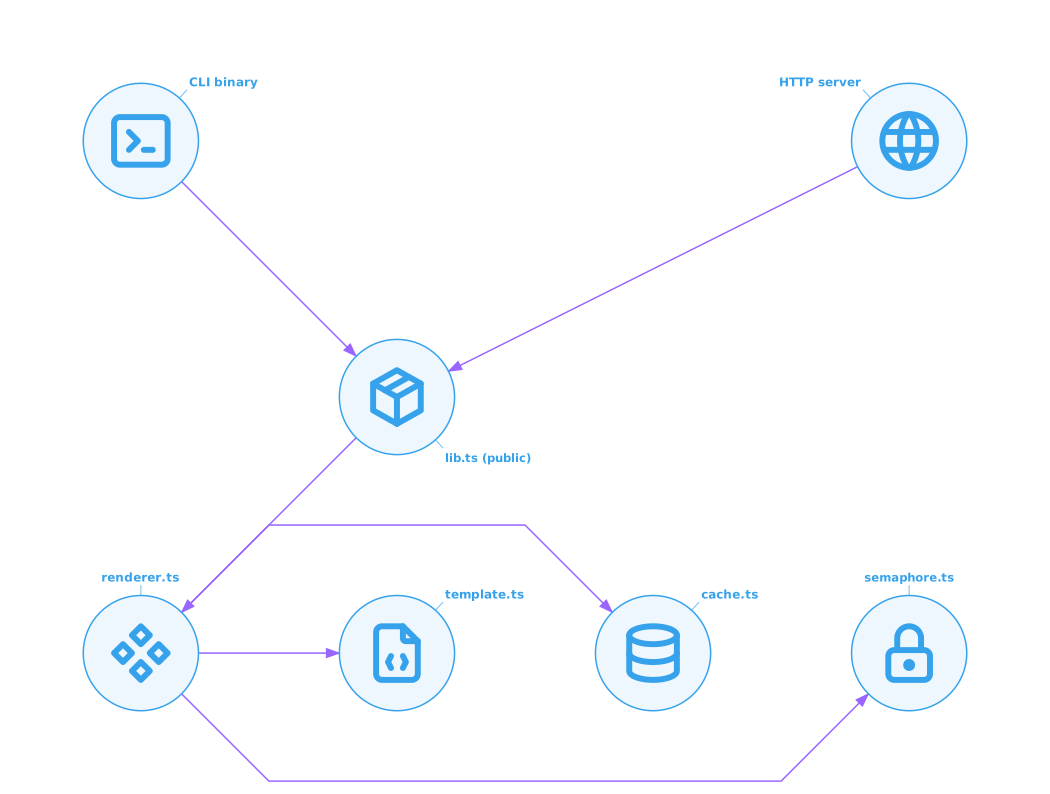
lib.tsis the public surface — exportsrenderChart,closeBrowser,rendererStats,computeHash, etc. Semver-stable.renderer.ts,template.ts,cache.ts,semaphore.tsare implementation details. Not covered by semver — may change between minor versions.
If you import from chartjs2img/* (anything other than the package root) you're reaching into implementation — those paths are not covered by semver. Stick to the symbols listed in Exports.