
Developer Guide
You've cloned the repo and want to understand or extend chartjs2img. This page points you to the right spot for each kind of change.
What this project is
A thin service around Chart.js rendered on one of two engines — the default skia engine (native Skia canvas, in-process, no browser) or the browser engine (headless Chromium via puppeteer):
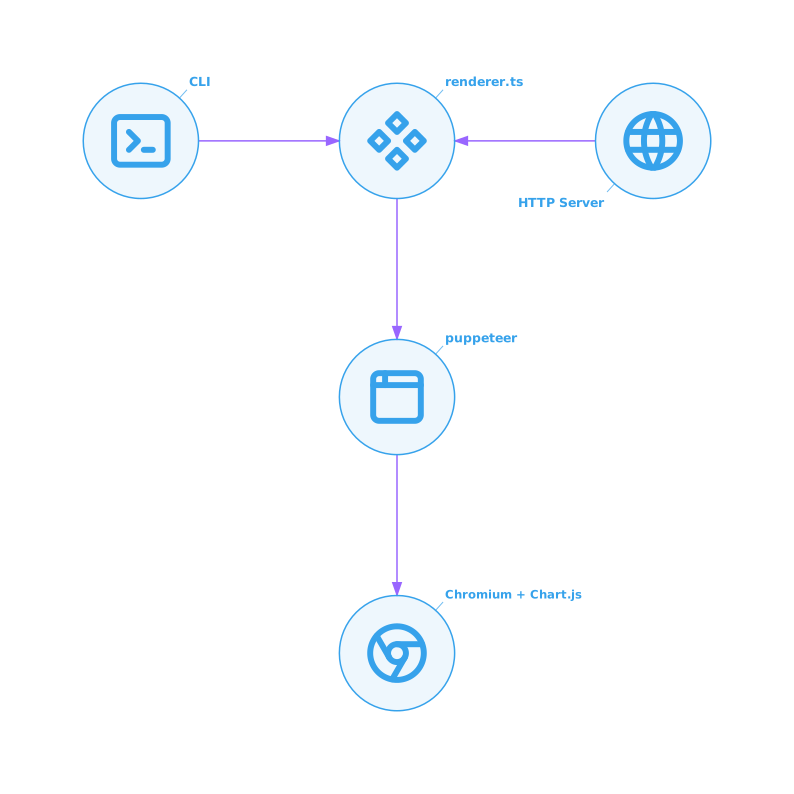
Everything on the Node side is written so it can run unchanged under bun --compile — there's no build step required for development.
Repo layout
chartjs2img/
├── src/
│   ├── index.ts         # CLI entry point: argv parser, subcommand dispatch
│   ├── cli.ts           # `render` + `examples` CLI implementations
│   ├── server.ts        # `serve` HTTP server (Bun.serve)
│   ├── renderer.ts      # Engine dispatch: skia (in-process) + browser (puppeteer/Chromium) pipelines
│   ├── template.ts      # Static HTML template loaded in the browser
│   ├── cache.ts         # In-memory LRU + TTL cache
│   ├── semaphore.ts     # Tiny async semaphore for concurrency control
│   ├── examples.ts      # Built-in chart examples (used by CLI + gallery)
│   ├── version.ts       # Single source of truth for VERSION
│   └── llm-docs/        # Per-module LLM-oriented Markdown snippets
│       ├── index.ts     # Aggregates + exports getLlmDocs()
│       ├── usage.ts
│       ├── chartjs-core.ts
│       ├── plugin-*.ts
│       ├── chart-*.ts
│       └── adapter-*.ts
├── examples/            # JSON inputs + PNG outputs (regenerable)
├── docs/                # VitePress bilingual documentation site
├── .github/workflows/   # CI
├── Dockerfile
├── package.json
└── README.md
The code base is intentionally small (~2000 LOC excluding llm-docs) — the heavy lifting happens either in-process on the native Skia canvas (default) or inside Chromium (browser engine). When you're reading, the interesting file is usually renderer.ts.
Common contribution flows
"I want to add another Chart.js plugin"
"I want to document a plugin for LLMs"
See Adding LLM docs.
"I want to tune concurrency / cache / browser behavior"
See Architecture for the moving parts, then check Modules for which file to edit. Most knobs are env vars — no rebuild needed.
"I hit a bug in rendering"
Check the captured console messages first. Both engines collect Chart.js console output during a render — the skia engine in-process, the browser engine via renderer.ts's page.on('console', …) + window.__chartMessages. They surface to the caller via X-Chart-Messages (HTTP) or stderr (CLI) — see Error handling.
Running from source
bun install
bun run dev              # HTTP server on :3000
bun run cli -- help      # CLI help
bun run cli -- llm       # LLM reference output
bun run prepends the project's local binaries and doesn't need a compiled binary. Type check with bun run typecheck.
Running the full site locally
bun run docs:dev # VitePress dev server on :5173The docs site has no backend. It reads docs/en/** and docs/ja/**, plus the sidebar/nav defined in docs/.vitepress/config.ts.
Where to go next
- Library API (TypeScript) — import
renderChartand friends from any Bun / Node program. - Architecture — request flow from HTTP to PNG.
- Modules — one-line summary of each
src/*.tsfile. - Types & HTTP schema — every interface and every HTTP body.
- Adding a Chart.js plugin — 3-file change, <10 lines.
- Adding LLM docs — add a plugin's option table to
chartjs2img llm. - Error handling — how renderer errors / Chart.js errors / server errors differ.