# chartjs2img — full documentation (v0.3.0)
> Concatenated English docs plus the aggregated `chartjs2img llm` reference (Chart.js core + 12 bundled plugins). Auto-generated; do not edit by hand.
---
# AI Guide
chartjs2img is built to be **driven by an LLM agent**. You describe
what you want in natural language; an agent produces a valid
Chart.js configuration JSON, renders it with chartjs2img, reads back
any Chart.js errors, and iterates — no manual reference-pasting
required.
This guide is **task-oriented**. Pick one of the three usage paths
below and follow it end-to-end. Each tutorial starts from a clean
machine and ends with a rendered PNG plus the command to update
later.
## Three ways to use chartjs2img from an agent
| Tutorial | Best for |
| ----------------------------------------- | ------------------------------------------------------------------------------ |
| [Claude Code plugin](./claude-plugin) | You use Claude Code. Slash commands (`/chartjs2img-install`, `/chartjs2img-author`, `/chartjs2img-render`) drive the whole workflow. |
| [`gh skill`](./gh-skill) | You want the same skill bundle installed into Copilot, Cursor, Gemini CLI, or Codex alongside (or instead of) Claude Code. |
| [context7 (MCP)](./context7) | You want an agent to retrieve chartjs2img's docs via MCP without installing anything plugin-side. Read-only. |
You can mix and match. The Claude plugin includes a `/chartjs2img-install`
skill that fetches the CLI binary; `gh skill` gives you the same
skills in other hosts; context7 is a parallel retrieval channel that
works even without any plugin.
## What you'll need
None of this is installed by chartjs2img itself. Install whatever the
tutorial of your choice calls for before starting.
| Software | For which tutorial | Why |
| ---------------------------------------------------------------- | ------------------------------------- | -------------------------------------- |
| [git](https://git-scm.com/) | All | Plugin marketplaces clone over git. |
| [Claude Code](https://code.claude.com/) | Claude plugin, context7 | Host that runs the skills / MCP. |
| [GitHub CLI `gh`](https://cli.github.com/) (v2.90+) | `gh skill` | Provides the `gh skill` subcommand. |
| [Cursor](https://cursor.com/) / [Gemini CLI](https://github.com/google-gemini/gemini-cli) / [Codex](https://openai.com/index/introducing-codex/) | `gh skill` (optional target) | Alternative skill hosts. |
| `curl`, `tar`, `unzip` (windows) | `/chartjs2img-install` runtime | Downloading the chartjs2img binary. |
| `bun` ([install](https://bun.sh/)) | Only if building chartjs2img from source | You can use the release binary instead.|
You do **not** need to install the `chartjs2img` CLI manually — the
Claude plugin ships a `/chartjs2img-install` skill that handles it,
and `gh skill` users can run the same skill after installing it. If
you'd rather install chartjs2img outside your agent, follow the
standard [Quick start](/en/guide/) or [Install](/en/guide/install)
page; any install that puts `chartjs2img` on `$PATH` is picked up by
the skills automatically.
Chromium is handled separately by chartjs2img at render time — see
the main install guide if you're on linux-arm64.
## At a glance: what chartjs2img exposes
If you want the full tour before picking a tutorial:
- **[`chartjs2img llm`](./cli#chartjs2img-llm)** — one-shot Markdown
reference teaching an agent the Chart.js config JSON shape, every
bundled plugin's options, and the canonical examples. The
`/chartjs2img-author` skill already inlines the JSON shape and a
plugin catalog; reach for `chartjs2img llm` when an agent needs the
full option tables for a specific plugin.
- **[`/llms.txt`](https://chartjs2img.ideamans.com/llms.txt) + [`/llms-full.txt`](https://chartjs2img.ideamans.com/llms-full.txt)** — public discovery files on the docs site.
- **[`context7.json`](https://github.com/ideamans/chartjs2img/blob/main/context7.json)** — registers chartjs2img for [context7](./context7) MCP retrieval.
- **[`plugins/chartjs2img`](https://github.com/ideamans/chartjs2img/tree/main/plugins/chartjs2img)** — three skills (`chartjs2img-install`, `chartjs2img-render`, `chartjs2img-author`) distributed via Claude Code and `gh skill`.
The [CLI reference page](./cli) documents `chartjs2img llm` in full —
useful whether an agent is driving it through a skill or you're
running it manually in a terminal.
## Tutorials
Start here:
- **[Claude Code plugin](./claude-plugin)** — 10-minute path if you
already use Claude Code.
- **[`gh skill`](./gh-skill)** — if you want the skills in Copilot /
Cursor / Gemini / Codex.
- **[context7](./context7)** — if you want an agent to *retrieve*
chartjs2img docs over MCP without installing anything chartjs2img-
specific.
---
# Claude Code plugin
The `chartjs2img` plugin bundles three skills that let Claude Code
install the CLI, author configs from a description, and render to
PNG / JPEG / WebP. The Chart.js JSON shape and a plugin catalog are
inlined into the author skill itself — no separate "load the
reference" step required.
## Prerequisites
- [Claude Code](https://code.claude.com/) installed and working.
- `git` on `PATH` (the marketplace is a git clone).
That's it. The plugin's `/chartjs2img-install` skill handles the CLI
binary + auto-downloads Chromium.
## 1. Add the marketplace
The chartjs2img plugin is distributed via **ideamans/claude-public-plugins**
(an aggregate marketplace for Ideamans' open-source plugins).
In Claude Code:
```
/plugin marketplace add ideamans/claude-public-plugins
```
The first add clones the marketplace; subsequent sessions reuse the
cache. Claude Code will confirm with something like:
```
Added marketplace ideamans-plugins from github.com/ideamans/claude-public-plugins
```
## 2. Install the plugin
```
/plugin install chartjs2img@ideamans-plugins
```
This registers three slash commands:
- `/chartjs2img-install` — install / update the CLI
- `/chartjs2img-author` — compose a config from a description (JSON
constraints and plugin catalog inlined)
- `/chartjs2img-render` — render a config to PNG / JPEG / WebP
## 3. Install the CLI binary
```
/chartjs2img-install
```
The skill:
1. Detects your OS + arch (linux / darwin / windows × amd64 / arm64).
2. Fetches the matching release asset from github.com/ideamans/chartjs2img/releases.
3. Verifies the SHA-256 checksum.
4. Drops the binary in `~/.local/bin` (or another writable PATH directory).
5. Runs `chartjs2img --version` to confirm.
If no writable PATH directory exists, the skill stages the binary in
`/tmp` and prints the exact `sudo mv` command to complete the install.
Verify:
```
chartjs2img --version
```
Should print `chartjs2img v0.2.2` (or whatever tag is latest).
## 4. Author a chart
```
/chartjs2img-author monthly sales bar chart for Jan-Jun, data 12 19 3 5 2 15
```
The skill picks the chart type (`bar`), fills in a realistic skeleton,
validates with `chartjs2img render`, and iterates on any Chart.js
error messages until the render is clean.
It hands back the PNG path plus the JSON config so you can save, edit,
or feed into your own pipeline.
If the agent needs deeper plugin-option detail than the skill inlines,
it can pipe `chartjs2img llm` (or a single section of it) into the
conversation — see the [CLI reference](./cli#chartjs2img-llm).
## 5. Render an existing config
If you already have a `.json` file:
```
/chartjs2img-render sales.json
```
The skill redirects `chartjs2img render`'s stderr and inspects it for
`[chart ERROR]` / `[chart WARN]` messages. A clean render ends with a
one-line summary (path + size); a messaged render ends with concrete
fix suggestions (misspelled chart type, missing dataset shape, etc.).
## Updating
When a new chartjs2img version ships:
```
/plugin marketplace update
/plugin update chartjs2img@ideamans-plugins
/chartjs2img-install # upgrades the CLI binary in place
```
The plugin manifest's `version` is pinned to chartjs2img's own version,
so a CLI bump implies a plugin bump.
## Troubleshooting
**`/chartjs2img-* : unknown command`** — the plugin isn't installed.
Run `/plugin list` to confirm; if missing, repeat step 2.
**`chartjs2img: command not found`** — binary not on PATH. Run
`/chartjs2img-install` again, or check whether your shell picked up
`~/.local/bin` (start a new shell or `exec $SHELL`).
**Rendering fails with a Chromium error** — on first render,
chartjs2img downloads Chrome for Testing. If that fails (firewall,
corporate proxy, linux-arm64), fall back to manual install + set
`CHROMIUM_PATH`. See [Install](/en/guide/install).
**Rendered image is blank** — check the skill's output for
`X-Chart-Messages`. A typo in `chart.type` or missing `datasets` is
the usual culprit. The render still succeeded technically (exit 0),
but Chart.js gave up on drawing.
## See also
- [CLI reference](./cli) — the `chartjs2img llm` output format.
- [`gh skill` tutorial](./gh-skill) — the same skills in Copilot / Cursor / Gemini / Codex.
- [Plugin publishing checklist](https://github.com/ideamans/chartjs2img/blob/main/plugins/chartjs2img/PUBLISH.md) — how we keep the plugin in sync with releases.
---
# CLI reference — `chartjs2img llm`
This is a **reference page**, not a tutorial. Start with one of the
tutorials ([Claude plugin](./claude-plugin) / [`gh skill`](./gh-skill)
/ [context7](./context7)) if you haven't installed anything yet.
One `chartjs2img` subcommand exists specifically for LLM consumption:
`chartjs2img llm`. It prints a self-contained Markdown reference of
Chart.js core plus every bundled plugin. Pipe it into your agent's
context on session start and configs come out right first try.
## Usage
```sh
chartjs2img llm
```
- No network access.
- No arguments.
- Stdout only.
The output covers:
- **Usage guide** — how to invoke chartjs2img (CLI vs HTTP), input JSON shape, constraints (JSON only, no functions), and caveats.
- **Chart.js core** — all 8 built-in chart types (`bar`, `line`, `pie`, `doughnut`, `radar`, `polarArea`, `scatter`, `bubble`), dataset properties, scales, and the `title` / `legend` / `tooltip` plugin option trees.
- **Bundled plugin options** — 12 sections:
- `chartjs-plugin-datalabels`
- `chartjs-plugin-annotation`
- `chartjs-plugin-zoom`
- `chartjs-plugin-gradient`
- `chartjs-chart-treemap`
- `chartjs-chart-matrix`
- `chartjs-chart-sankey`
- `chartjs-chart-wordcloud`
- `chartjs-chart-geo`
- `chartjs-chart-graph`
- `chartjs-chart-venn`
- `chartjs-adapter-dayjs-4`
Each section includes option tables (property path, type, default,
description) and a JSON example.
The Markdown is regenerated from source (`src/llm-docs/*.ts`) on
every build, so it can never drift from the implementation.
## Output shape at a glance
Approximate structure:
```
# Usage
## Chart.js core (chart.js@4.4.9)
## Datalabels (chartjs-plugin-datalabels)
## Annotation (chartjs-plugin-annotation)
## Zoom (chartjs-plugin-zoom)
...
## Gradient (chartjs-plugin-gradient)
...
```
Total output: ~1400 lines, ~135 KB. Fits comfortably in modern
context windows.
## Agent prompt templates
### Minimal — opening turn
```text
You are going to author Chart.js configurations that chartjs2img will
render to images. The complete reference follows. When you produce a
JSON config:
1. Validate with `chartjs2img render -i -o /tmp/check.png 2> /tmp/check.err`.
2. If /tmp/check.err is non-empty, fix and retry.
3. Report the final JSON plus the rendered image path.
---
---
```
### Richer — with explicit gotchas
```text
Gotchas to remember:
- JSON has no functions — do not use `options.scales.y.ticks.callback` or `datalabels.formatter`.
- Animation is forced OFF internally — don't propose animated configs.
- Datalabels is disabled by default — set `options.plugins.datalabels.display: true` to show labels.
- Time-series axes need `"type": "time"` — the dayjs adapter is bundled.
```
## Piping into standard LLM CLIs
### OpenAI / generic `llm` CLI
```sh
chartjs2img llm \
| llm -s "Generate a Chart.js config for monthly sales, Jan-Jun, values 12 19 3 5 2 15"
```
### Clipboard (macOS)
```sh
chartjs2img llm | pbcopy
```
Then paste into your agent's system-prompt box.
### File
```sh
chartjs2img llm > /tmp/chartjs2img-reference.md
```
Re-use across sessions.
## Relationship to other AI channels
- **`llms-full.txt`** on the docs site has a superset — it appends
every docs/en/ Markdown page to the same reference. Use it if your
agent wants both the reference and the guide pages in one payload.
- **context7** retrieves the same content via MCP when a full-bundle
is too big for your context window.
- **`chartjs2img-author` SKILL.md** inlines the JSON shape, the error
feedback contract, and a plugin catalog so the skill is
self-contained. Agents fall back to `chartjs2img llm` only when
they need the full option tables for a specific plugin.
Whichever channel an agent uses, the actual content is derived from
the same `src/llm-docs/*.ts` files, so consistency is guaranteed.
## Extending
To add / change what `chartjs2img llm` outputs, edit the relevant file
under `src/llm-docs/`. See the [Developer Guide → Adding LLM docs](/en/developer/adding-llm-doc)
for the full format.
## Troubleshooting
**`chartjs2img: command not found`** — install the binary first. See
[Install](/en/guide/install) or run `/chartjs2img-install` if you have
the Claude plugin.
**Output is empty** — that would be a bug; file an issue. The
aggregator always has at least the `usage` section.
**Output looks outdated** — check `chartjs2img --version`. Each
release rebuilds `src/llm-docs/` from the pinned plugin versions in
`src/template.ts`; old binaries reflect old plugin versions.
## See also
- [AI Guide overview](./) — pick a tutorial.
- [llms.txt](./llms-txt) — the same reference served as a static file.
- [Developer Guide → Adding LLM docs](/en/developer/adding-llm-doc) — how to extend the output.
---
# context7 (MCP retrieval)
[context7](https://context7.com/) is an Upstash MCP service that
crawls a repo's documentation and serves it to any agent that speaks
[MCP](https://modelcontextprotocol.io/). Register chartjs2img once;
every MCP-capable agent (Claude Code, Cursor, Gemini CLI, Codex,
anything using the spec) can resolve + query the docs without
installing anything else.
This is a **read-only** path — context7 doesn't give agents the
ability to render charts. For that, combine it with the
[Claude plugin](./claude-plugin) or [`gh skill`](./gh-skill) tutorial.
## What context7 does for chartjs2img
When an agent asks "how do I show data labels on a bar chart in
chartjs2img?", context7:
1. Resolves `chartjs2img` to our registered library ID.
2. Searches our docs for the relevant passage (datalabels section +
the bar example + `plugins/datalabels.display: true` requirement).
3. Returns it to the agent as MCP tool output.
No CLI install, no skill install, no binary download. Pure docs
retrieval.
## How it's set up
A `context7.json` file at the repo root tells context7 what to index:
```json
{
"$schema": "https://context7.com/schema/context7.json",
"projectTitle": "chartjs2img",
"description": "Server-side Chart.js rendering service...",
"folders": ["docs/en", "examples", "src/llm-docs"],
"excludeFolders": ["docs/.vitepress", "docs/public", "docs/ja", "node_modules", "dist", "tests"],
"rules": ["Input is always Chart.js configuration JSON. ...", "..."]
}
```
The `rules` array contains 9 chartjs2img-specific pitfalls — JSON
input shape, no-functions constraint, animation forced off, datalabels
off-by-default, X-Chart-Messages feedback, exit codes, Chromium
availability. Agents always see these, regardless of which specific
doc passage they retrieve.
The live file: [github.com/ideamans/chartjs2img/blob/main/context7.json](https://github.com/ideamans/chartjs2img/blob/main/context7.json).
## How to use it from an MCP-capable agent
### Claude Code
In a session, two MCP tools become relevant:
- `mcp__context7__resolve-library-id` — input: `"chartjs2img"` or a
vague phrase; output: the canonical library id.
- `mcp__context7__query-docs` — input: library id + a natural-language
question; output: the retrieved passages.
Example flow the agent runs automatically:
```
user: "Draw a pie chart with data labels."
assistant calls mcp__context7__resolve-library-id("chartjs2img")
→ returns "/ideamans/chartjs2img"
assistant calls mcp__context7__query-docs(
libraryId="/ideamans/chartjs2img",
query="pie chart with data labels")
→ returns the pie example + the datalabels section
assistant drafts a JSON config and (if the plugin is installed)
calls /chartjs2img-render to produce the PNG.
```
### Other MCP hosts
Any agent host that speaks MCP can add context7 as a server:
```bash
# In your MCP host's config
servers:
context7:
url: https://mcp.context7.com/
```
Check the host's docs for the exact configuration path (each host
stores MCP server configs differently).
## When context7 is helpful vs not
- **Helpful** when you need answers to "what does option X do" / "what
plugin handles feature Y" / "what's the shape of data for chart
type Z". One-shot retrieval, no install.
- **Not helpful** for actually rendering — that requires the CLI
binary. Use [Claude plugin](./claude-plugin) or
[`gh skill`](./gh-skill) for the render-loop.
- **Complementary**: context7 + the author/render skills is the best
combo. context7 surfaces the right option shape; the render skill
validates it produces a clean PNG.
## Checking that the registration succeeds
After we push `context7.json`, context7 crawls on its own schedule
(typically a few hours). From the context7 web UI
([context7.com/add-package](https://context7.com/add-package)) you
can request an expedited crawl.
Once indexed, test from Claude Code:
```
mcp__context7__resolve-library-id → ask for "chartjs2img"
```
Should return something like `/ideamans/chartjs2img`. If it returns
empty, the crawl hasn't completed yet; check back in an hour or two.
## What we exclude from the index
- `docs/ja/**` — Japanese is a mirror of English, and duplicated
content hurts retrieval quality. English is treated as canonical.
- `docs/.vitepress/**` — build config, not content.
- `docs/public/**` — generated artifacts (llms.txt, example PNGs).
- `node_modules/`, `dist/`, `tests/` — not docs.
If you need Japanese retrieval, file an issue — we can add a second
context7 registration for the JA docs.
## See also
- [llms.txt](./llms-txt) — a parallel, simpler discovery file at the site root.
- [CLI reference](./cli) — `chartjs2img llm` produces the same reference offline.
- [context7 docs](https://context7.com/docs/adding-libraries) — how to register your own projects.
---
# `gh skill` (multi-host)
The same `SKILL.md` files that the Claude Code plugin ships are
Agent Skills standard. `gh skill` (GitHub CLI v2.90+) can install
them into any host that honors the spec.
## Who should read this
Pick `gh skill` over the Claude plugin tutorial if:
- You use **GitHub Copilot**, **Cursor**, **Gemini CLI**, or **OpenAI Codex** (with or without Claude Code alongside).
- You want to pin to a specific git tree SHA so updates are explicit.
- You prefer the `gh` workflow to the Claude marketplace flow.
## Prerequisites
- GitHub CLI **v2.90.0 or later** (`gh --version`).
- The host you're targeting installed and working (Copilot / Cursor / Gemini / Codex / Claude Code).
Verify:
```bash
gh --version # must be ≥ 2.90.0
gh skill --help # the skill subcommand should list install / update / preview / search / publish
```
## Install the three skills
Each skill is installed independently so you can choose which ones
you want. Typical full set:
```bash
gh skill install ideamans/chartjs2img plugins/chartjs2img/skills/chartjs2img-render --agent claude-code
gh skill install ideamans/chartjs2img plugins/chartjs2img/skills/chartjs2img-author --agent claude-code
gh skill install ideamans/chartjs2img plugins/chartjs2img/skills/chartjs2img-install --agent claude-code
```
`--agent` can be any of `claude-code`, `copilot`, `cursor`, `gemini`,
`codex`. Run the same command multiple times with different `--agent`
values to install the skill into multiple hosts.
Check what's installed:
```bash
gh skill list
```
## Skill bundle overview
Same three skills as the Claude Code plugin, so content doesn't drift:
| Skill | Use when… |
| ------------------------- | ------------------------------------------------------------------ |
| `chartjs2img-install` | You need to install / update the `chartjs2img` CLI binary. |
| `chartjs2img-author` | You have a description but no JSON config yet. The Chart.js JSON shape and a 14-entry plugin catalog are inlined. |
| `chartjs2img-render` | You have a JSON config and want a PNG / JPEG / WebP back. |
Need deeper option tables for a specific plugin? `chartjs2img llm`
(the CLI subcommand) prints the full ~1400-line reference — pipe all
of it or one `## ` section into the agent as needed.
Each has standards-compliant frontmatter (`name`, `description`,
`license`, `compatibility`, `allowed-tools`) only — see the
[Agent Skills spec](https://agentskills.io/specification). No
Claude-only fields are used, so a skill installed to Copilot behaves
the same as one installed to Claude Code.
## Provenance via frontmatter
`gh skill install` writes three fields into the SKILL.md copy it places
in your host's skill directory:
- `repository: ideamans/chartjs2img`
- `ref: main` (or the specific ref you pinned)
- a tree SHA of `plugins/chartjs2img/skills/` at install time
That tree SHA is how `gh skill update` detects changes — you don't need
a version bump on our side. Any change to the skill body flows through
on `gh skill update`.
## Updating
```bash
gh skill update # updates all installed skills
gh skill update chartjs2img-render # one by name
```
## Pinning to a specific version
By default `gh skill install` pins to the current `main` tree SHA. If
you want a specific release:
```bash
gh skill install ideamans/chartjs2img plugins/chartjs2img/skills/chartjs2img-render \
--ref v0.2.2 \
--agent claude-code
```
Replace `v0.2.2` with the chartjs2img tag you want. `gh skill update`
won't move you off a pinned ref unless you explicitly unpin.
## What you can't do with `gh skill`
- `gh skill` doesn't install the `chartjs2img` CLI binary itself. Run
`/chartjs2img-install` from your host after installation, or use one
of the install paths in the main [Install guide](/en/guide/install).
- `gh skill` doesn't orchestrate skills across hosts. If you want the
same skill in multiple agents, run `gh skill install` once per
`--agent`.
## Verifying the install
In your agent host, invoke any of the three skills — e.g.
`/chartjs2img-render`. It should return the skill body without a
"skill not found" error.
If a skill isn't found, check `gh skill list` then look at the host-
specific skill directory (Claude Code: `~/.claude/skills/`; others
documented by the host).
## See also
- [Claude Code plugin](./claude-plugin) — alternative install path.
- [CLI reference](./cli) — what `chartjs2img llm` returns.
- [Agent Skills spec](https://agentskills.io/specification) — the open standard the skills implement.
---
# llms.txt
chartjs2img publishes two public discovery files at the docs site
root, following the [llmstxt.org](https://llmstxt.org/) convention.
They are designed for LLM agents that land on the site without any
prior chartjs2img knowledge.
| URL | Size | What it is |
| ------------------------------------------------------------------------------- | ---------- | ----------------------------------------------------------- |
| [`/llms.txt`](https://chartjs2img.ideamans.com/llms.txt) | ~3 KB | Index: grouped links to every English docs page |
| [`/llms-full.txt`](https://chartjs2img.ideamans.com/llms-full.txt) | ~135 KB | Full bundle: concatenated Markdown of every page + `chartjs2img llm` reference |
## When to use which
### `llms.txt` — index
Use when the agent wants to **browse**. It's a short Markdown
document with:
- An H1 project title
- A blockquote summary
- `## User Guide`, `## Developer Guide`, `## AI Guide`, `## Gallery`
sections, each listing pages as bullet links
- A final `## LLM reference (single bundle)` pointer to `llms-full.txt`
Example usage from a shell:
```bash
curl -s https://chartjs2img.ideamans.com/llms.txt | head -20
```
### `llms-full.txt` — full bundle
Use when the agent wants **everything in one payload**. It contains
the Markdown body of every English page, preceded by
`` comments that name the origin file, separated
by `---` horizontal rules. At the end, `chartjs2img llm`'s full
~1400-line Chart.js + plugin reference is appended.
This is "give my agent the whole manual and let it search in-context."
Appropriate for:
- One-shot agents without retrieval tools (copy the whole thing into
the system prompt)
- Extended context windows (Claude, Gemini, GPT-4o with their long
context modes)
- Offline inspection / audit
```bash
curl -s https://chartjs2img.ideamans.com/llms-full.txt | wc -l
```
## How the files are generated
`docs/public/llms.txt` and `docs/public/llms-full.txt` are **not
checked in**. They are regenerated at site-build time by
`scripts/build-llms-txt.ts`:
1. Walk `docs/en/**/*.md`, extract title + body.
2. Sort pages by route.
3. `llms.txt` → group pages by top-level section, emit link list.
4. `llms-full.txt` → concatenate every body, append `getLlmDocs()`
(the aggregated Chart.js + plugin reference).
5. Write both under `docs/public/` — VitePress serves them from the
site root.
Trigger manually:
```bash
bun run build-llms-txt
# output:
# wrote chars → docs/public/llms.txt
# wrote chars → docs/public/llms-full.txt ( docs concatenated)
```
The same script runs inside `docs:dev` / `docs:build` / `ai:regen`.
## Relationship to other AI channels
| Channel | Audience | Distribution |
| ---------------------- | ---------------------------------------- | ------------------------------------------ |
| **llms.txt** | Any agent that can `curl` | Static file on the docs site |
| **llms-full.txt** | Same, when full-text is cheaper than search | Static file on the docs site |
| [**context7**](./context7) | MCP-capable hosts | MCP server |
| [**Claude plugin**](./claude-plugin) | Claude Code | Marketplace |
| [**gh skill**](./gh-skill) | Copilot / Cursor / Gemini / Codex | GitHub CLI |
| [**`chartjs2img llm`**](./cli)| An agent running chartjs2img itself | CLI output (`chartjs2img llm`) |
llms.txt is the simplest, no-install channel. Even a zero-config
shell script can fetch and use it.
## What agents should do with `llms-full.txt`
A useful opening turn for an agent session:
```
SYSTEM: You are going to author Chart.js configuration JSON for
chartjs2img. The complete reference follows. It covers the
input format, every supported chart type, every bundled
plugin's options, error feedback, and canonical examples.
---
---
When you produce a Chart.js configuration:
1. Validate it via a subsequent `chartjs2img render` call.
2. If X-Chart-Messages (HTTP) or stderr (CLI) is non-empty,
fix the config and retry.
3. Report the final JSON plus the rendered image path.
```
## URL convention
Both files are served at fixed paths, guaranteed stable:
- `https://chartjs2img.ideamans.com/llms.txt`
- `https://chartjs2img.ideamans.com/llms-full.txt`
No redirects, no auth, no user-agent sniffing. They are intended to be
`curl`-able from any environment.
## See also
- [llmstxt.org](https://llmstxt.org/) — the public standard.
- [Anthropic's llms.txt](https://code.claude.com/docs/llms.txt), [Vercel's](https://vercel.com/llms.txt), [Next.js's](https://nextjs.org/docs/llms-full.txt) — real-world reference implementations.
- [context7](./context7) — parallel MCP retrieval for agents that prefer search over full-bundle.
- [CLI reference](./cli) — how `chartjs2img llm` produces the reference that `llms-full.txt` appends.
---
# Developer Guide
You've cloned the repo and want to understand or extend chartjs2img.
This page points you to the right spot for each kind of change.
## What this project is
A thin service around **Chart.js rendered inside headless Chromium**:
Everything on the Node side is written so it can run unchanged under
`bun --compile` — there's no build step required for development.
## Repo layout
```
chartjs2img/
├── src/
│ ├── index.ts # CLI entry point: argv parser, subcommand dispatch
│ ├── cli.ts # `render` + `examples` CLI implementations
│ ├── server.ts # `serve` HTTP server (Bun.serve)
│ ├── renderer.ts # Puppeteer + Chromium lifecycle, screenshot pipeline
│ ├── template.ts # Static HTML template loaded in the browser
│ ├── cache.ts # In-memory LRU + TTL cache
│ ├── semaphore.ts # Tiny async semaphore for concurrency control
│ ├── examples.ts # Built-in chart examples (used by CLI + gallery)
│ ├── version.ts # Single source of truth for VERSION
│ └── llm-docs/ # Per-module LLM-oriented Markdown snippets
│ ├── index.ts # Aggregates + exports getLlmDocs()
│ ├── usage.ts
│ ├── chartjs-core.ts
│ ├── plugin-*.ts
│ ├── chart-*.ts
│ └── adapter-*.ts
├── examples/ # JSON inputs + PNG outputs (regenerable)
├── docs/ # VitePress bilingual documentation site
├── .github/workflows/ # CI
├── Dockerfile
├── package.json
└── README.md
```
The code base is intentionally small (~2000 LOC excluding llm-docs) —
all the heavy lifting happens inside Chromium. When you're reading, the
interesting file is usually `renderer.ts`.
## Common contribution flows
### "I want to add another Chart.js plugin"
See [Adding a Chart.js plugin](./adding-plugin).
### "I want to document a plugin for LLMs"
See [Adding LLM docs](./adding-llm-doc).
### "I want to tune concurrency / cache / browser behavior"
See [Architecture](./architecture) for the moving parts, then check
[Modules](./modules) for which file to edit. Most knobs are env vars —
no rebuild needed.
### "I hit a bug in rendering"
Check the browser console first. In `renderer.ts`, `page.on('console',
…)` and `window.__chartMessages` capture both Chromium-side and
Chart.js-side errors. They surface to the caller via `X-Chart-Messages`
(HTTP) or stderr (CLI) — see [Error handling](./error-handling).
## Running from source
```bash
bun install
bun run dev # HTTP server on :3000
bun run cli -- help # CLI help
bun run cli -- llm # LLM reference output
```
`bun run` prepends the project's local binaries and doesn't need a
compiled binary. Type check with `bun run typecheck`.
## Running the full site locally
```bash
bun run docs:dev # VitePress dev server on :5173
```
The docs site has no backend. It reads `docs/en/**` and `docs/ja/**`,
plus the sidebar/nav defined in `docs/.vitepress/config.ts`.
## Where to go next
- **[Library API (TypeScript)](./library-api)** — import `renderChart` and friends from any Bun / Node program.
- **[Architecture](./architecture)** — request flow from HTTP to PNG.
- **[Modules](./modules)** — one-line summary of each `src/*.ts` file.
- **[Types & HTTP schema](./types)** — every interface and every HTTP body.
- **[Adding a Chart.js plugin](./adding-plugin)** — 3-file change, <10 lines.
- **[Adding LLM docs](./adding-llm-doc)** — add a plugin's option table to `chartjs2img llm`.
- **[Error handling](./error-handling)** — how renderer errors / Chart.js errors / server errors differ.
---
# Adding LLM docs
`chartjs2img llm` prints a ~1400-line Markdown reference that teaches
an LLM how to write Chart.js configs for chartjs2img. Each section
lives in one `src/llm-docs/*.ts` file.
## When to add one
- You added a Chart.js plugin in [Adding a Chart.js plugin](./adding-plugin). Each plugin gets its own doc file.
- You noticed the existing reference misses a common foot-gun that agents keep tripping on.
- You upgraded a plugin version and its option shape changed.
## File shape
A `llm-docs/*.ts` file is a single-purpose ESM module that exports a
string called `doc`:
```ts
// src/llm-docs/plugin-example.ts
export const doc = `
## Example plugin (chartjs-plugin-example)
### Options
| Option | Type | Default | Description |
| ------------------------------------- | -------- | ------- | ------------------------ |
| \`options.plugins.example.enabled\` | boolean | \`false\` | Master toggle |
| \`options.plugins.example.color\` | string | - | CSS color |
### JSON example
\`\`\`json
{
"type": "bar",
"data": { "labels": ["A"], "datasets": [{ "data": [1] }] },
"options": {
"plugins": {
"example": { "enabled": true, "color": "#f39c55" }
}
}
}
\`\`\`
### Caveats
- \`enabled: true\` is required; the plugin is off by default.
- Does not support \`type: "treemap"\`.
`
```
Escaping rules:
- The file is a template literal, so you escape backticks (`` \` ``).
- Inside code-fence JSON, the template literal's `\n` becomes a real newline — you're just writing Markdown inside a JS string.
- TypeScript is not type-checking the Markdown; keep it consistent by hand.
## Register it
`src/llm-docs/index.ts` is the aggregator:
```ts
import { doc as pluginExample } from './plugin-example'
const docs = [
// ...existing entries...
pluginExample,
]
```
Order matters — `getLlmDocs()` joins entries with `\n\n` in array
order. Current convention:
1. `usage` (always first — sets context)
2. `chartjsCore`
3. Visual plugins (datalabels, annotation, zoom, gradient)
4. Chart-type plugins (treemap, matrix, sankey, wordcloud, geo, graph, venn)
5. Date adapter (`adapterDayjs`) last
Slot your new entry into the matching group.
## Conventions
**Headings.** Start each file with `## ` (H2, not H1 — the
bundle has no top-level H1). Sub-sections use H3.
**Option tables.** One big table per plugin. Put the full path in backticks
(`options.plugins.foo.bar`). Type column is free-form (prose is fine:
"function or string"). Mark required fields by writing `*required*` in
the Default column.
**Examples.** Always include at least one working JSON example. Keep
data tiny — 2-3 points is enough to show the shape. The example should
be copy-pasteable into `chartjs2img render`.
**Caveats.** A bullet list of things LLMs keep getting wrong. Lead with
the most common. "This plugin must be explicitly enabled" is a common
first bullet.
**No callbacks / functions.** Chart.js options accept functions
(`ticks.callback`, etc.) in the runtime API, but the HTTP/CLI input is
JSON. Mention when a plugin can't be fully expressed in JSON.
**Avoid unnecessary mentions of chartjs2img.** The doc is meant to
teach Chart.js config, not chartjs2img internals. Keep plugin docs
transferable.
## Verify
```bash
# 1. Type check
bun run typecheck
# 2. Print and eyeball
bun run cli -- llm | less
# 3. Grep for your new section
bun run cli -- llm | grep -A 20 "Example plugin"
# 4. Check total length (a reasonable doc is ~30-200 lines per plugin)
bun run cli -- llm | wc -l
```
## What NOT to put here
- **Release notes / changelog.** This is evergreen reference, not a history.
- **Server operations.** Env vars, Docker config, etc. belong in the [User Guide](../guide/).
- **Claude-specific instructions.** Agent Skills files (SKILL.md in `plugins/chartjs2img/skills/*`) are the right home for those — a context7 / Claude-only audience. `chartjs2img llm` is host-agnostic.
See the **Phase 2-B** section of PLAN.md for the upcoming
auto-generation of `docs/public/llms-full.txt` that will concatenate
the LLM docs with the guide pages.
---
# Adding a Chart.js plugin
You want to bundle another Chart.js ecosystem plugin (a new chart type,
a new decorator) so users can reference it in their config without
extra setup.
## The three-file change
### 1. Add it to `template.ts`
In `src/template.ts`, extend the `LIBS` object:
```ts
export const LIBS = {
// ...existing entries...
myNewPlugin: {
pkg: 'chartjs-chart-mynew', // npm package name
version: '1.2.3', // pin the exact version
file: 'dist/chartjs-chart-mynew.min.js', // UMD build path
},
} as const
```
`Object.values(LIBS).map(cdnUrl)` in the template automatically emits a
`
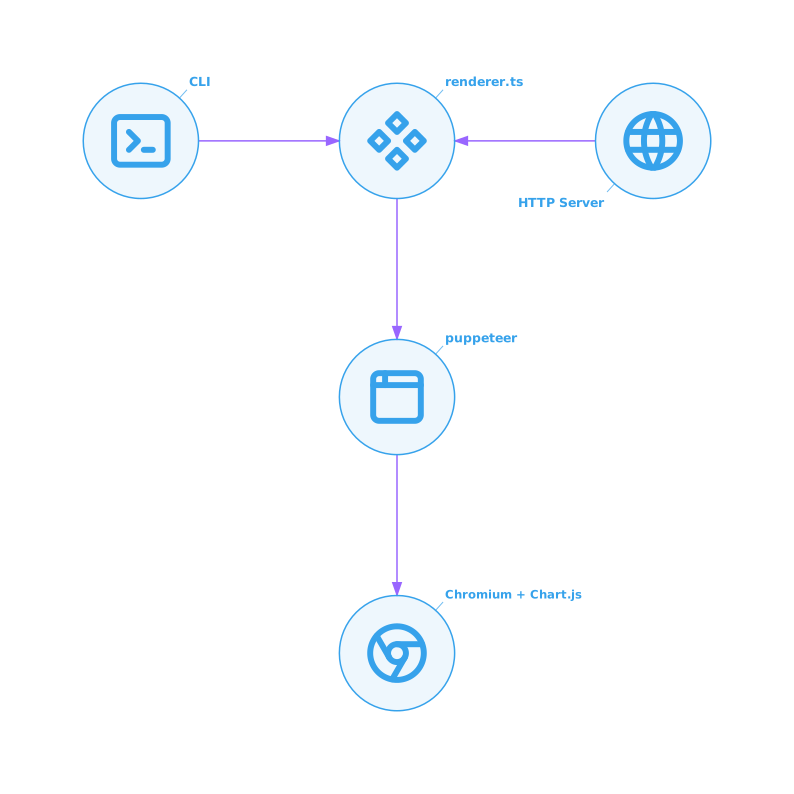 Everything on the Node side is written so it can run unchanged under
`bun --compile` — there's no build step required for development.
## Repo layout
```
chartjs2img/
├── src/
│ ├── index.ts # CLI entry point: argv parser, subcommand dispatch
│ ├── cli.ts # `render` + `examples` CLI implementations
│ ├── server.ts # `serve` HTTP server (Bun.serve)
│ ├── renderer.ts # Puppeteer + Chromium lifecycle, screenshot pipeline
│ ├── template.ts # Static HTML template loaded in the browser
│ ├── cache.ts # In-memory LRU + TTL cache
│ ├── semaphore.ts # Tiny async semaphore for concurrency control
│ ├── examples.ts # Built-in chart examples (used by CLI + gallery)
│ ├── version.ts # Single source of truth for VERSION
│ └── llm-docs/ # Per-module LLM-oriented Markdown snippets
│ ├── index.ts # Aggregates + exports getLlmDocs()
│ ├── usage.ts
│ ├── chartjs-core.ts
│ ├── plugin-*.ts
│ ├── chart-*.ts
│ └── adapter-*.ts
├── examples/ # JSON inputs + PNG outputs (regenerable)
├── docs/ # VitePress bilingual documentation site
├── .github/workflows/ # CI
├── Dockerfile
├── package.json
└── README.md
```
The code base is intentionally small (~2000 LOC excluding llm-docs) —
all the heavy lifting happens inside Chromium. When you're reading, the
interesting file is usually `renderer.ts`.
## Common contribution flows
### "I want to add another Chart.js plugin"
See [Adding a Chart.js plugin](./adding-plugin).
### "I want to document a plugin for LLMs"
See [Adding LLM docs](./adding-llm-doc).
### "I want to tune concurrency / cache / browser behavior"
See [Architecture](./architecture) for the moving parts, then check
[Modules](./modules) for which file to edit. Most knobs are env vars —
no rebuild needed.
### "I hit a bug in rendering"
Check the browser console first. In `renderer.ts`, `page.on('console',
…)` and `window.__chartMessages` capture both Chromium-side and
Chart.js-side errors. They surface to the caller via `X-Chart-Messages`
(HTTP) or stderr (CLI) — see [Error handling](./error-handling).
## Running from source
```bash
bun install
bun run dev # HTTP server on :3000
bun run cli -- help # CLI help
bun run cli -- llm # LLM reference output
```
`bun run` prepends the project's local binaries and doesn't need a
compiled binary. Type check with `bun run typecheck`.
## Running the full site locally
```bash
bun run docs:dev # VitePress dev server on :5173
```
The docs site has no backend. It reads `docs/en/**` and `docs/ja/**`,
plus the sidebar/nav defined in `docs/.vitepress/config.ts`.
## Where to go next
- **[Library API (TypeScript)](./library-api)** — import `renderChart` and friends from any Bun / Node program.
- **[Architecture](./architecture)** — request flow from HTTP to PNG.
- **[Modules](./modules)** — one-line summary of each `src/*.ts` file.
- **[Types & HTTP schema](./types)** — every interface and every HTTP body.
- **[Adding a Chart.js plugin](./adding-plugin)** — 3-file change, <10 lines.
- **[Adding LLM docs](./adding-llm-doc)** — add a plugin's option table to `chartjs2img llm`.
- **[Error handling](./error-handling)** — how renderer errors / Chart.js errors / server errors differ.
---
# Adding LLM docs
`chartjs2img llm` prints a ~1400-line Markdown reference that teaches
an LLM how to write Chart.js configs for chartjs2img. Each section
lives in one `src/llm-docs/*.ts` file.
## When to add one
- You added a Chart.js plugin in [Adding a Chart.js plugin](./adding-plugin). Each plugin gets its own doc file.
- You noticed the existing reference misses a common foot-gun that agents keep tripping on.
- You upgraded a plugin version and its option shape changed.
## File shape
A `llm-docs/*.ts` file is a single-purpose ESM module that exports a
string called `doc`:
```ts
// src/llm-docs/plugin-example.ts
export const doc = `
## Example plugin (chartjs-plugin-example)
Everything on the Node side is written so it can run unchanged under
`bun --compile` — there's no build step required for development.
## Repo layout
```
chartjs2img/
├── src/
│ ├── index.ts # CLI entry point: argv parser, subcommand dispatch
│ ├── cli.ts # `render` + `examples` CLI implementations
│ ├── server.ts # `serve` HTTP server (Bun.serve)
│ ├── renderer.ts # Puppeteer + Chromium lifecycle, screenshot pipeline
│ ├── template.ts # Static HTML template loaded in the browser
│ ├── cache.ts # In-memory LRU + TTL cache
│ ├── semaphore.ts # Tiny async semaphore for concurrency control
│ ├── examples.ts # Built-in chart examples (used by CLI + gallery)
│ ├── version.ts # Single source of truth for VERSION
│ └── llm-docs/ # Per-module LLM-oriented Markdown snippets
│ ├── index.ts # Aggregates + exports getLlmDocs()
│ ├── usage.ts
│ ├── chartjs-core.ts
│ ├── plugin-*.ts
│ ├── chart-*.ts
│ └── adapter-*.ts
├── examples/ # JSON inputs + PNG outputs (regenerable)
├── docs/ # VitePress bilingual documentation site
├── .github/workflows/ # CI
├── Dockerfile
├── package.json
└── README.md
```
The code base is intentionally small (~2000 LOC excluding llm-docs) —
all the heavy lifting happens inside Chromium. When you're reading, the
interesting file is usually `renderer.ts`.
## Common contribution flows
### "I want to add another Chart.js plugin"
See [Adding a Chart.js plugin](./adding-plugin).
### "I want to document a plugin for LLMs"
See [Adding LLM docs](./adding-llm-doc).
### "I want to tune concurrency / cache / browser behavior"
See [Architecture](./architecture) for the moving parts, then check
[Modules](./modules) for which file to edit. Most knobs are env vars —
no rebuild needed.
### "I hit a bug in rendering"
Check the browser console first. In `renderer.ts`, `page.on('console',
…)` and `window.__chartMessages` capture both Chromium-side and
Chart.js-side errors. They surface to the caller via `X-Chart-Messages`
(HTTP) or stderr (CLI) — see [Error handling](./error-handling).
## Running from source
```bash
bun install
bun run dev # HTTP server on :3000
bun run cli -- help # CLI help
bun run cli -- llm # LLM reference output
```
`bun run` prepends the project's local binaries and doesn't need a
compiled binary. Type check with `bun run typecheck`.
## Running the full site locally
```bash
bun run docs:dev # VitePress dev server on :5173
```
The docs site has no backend. It reads `docs/en/**` and `docs/ja/**`,
plus the sidebar/nav defined in `docs/.vitepress/config.ts`.
## Where to go next
- **[Library API (TypeScript)](./library-api)** — import `renderChart` and friends from any Bun / Node program.
- **[Architecture](./architecture)** — request flow from HTTP to PNG.
- **[Modules](./modules)** — one-line summary of each `src/*.ts` file.
- **[Types & HTTP schema](./types)** — every interface and every HTTP body.
- **[Adding a Chart.js plugin](./adding-plugin)** — 3-file change, <10 lines.
- **[Adding LLM docs](./adding-llm-doc)** — add a plugin's option table to `chartjs2img llm`.
- **[Error handling](./error-handling)** — how renderer errors / Chart.js errors / server errors differ.
---
# Adding LLM docs
`chartjs2img llm` prints a ~1400-line Markdown reference that teaches
an LLM how to write Chart.js configs for chartjs2img. Each section
lives in one `src/llm-docs/*.ts` file.
## When to add one
- You added a Chart.js plugin in [Adding a Chart.js plugin](./adding-plugin). Each plugin gets its own doc file.
- You noticed the existing reference misses a common foot-gun that agents keep tripping on.
- You upgraded a plugin version and its option shape changed.
## File shape
A `llm-docs/*.ts` file is a single-purpose ESM module that exports a
string called `doc`:
```ts
// src/llm-docs/plugin-example.ts
export const doc = `
## Example plugin (chartjs-plugin-example)